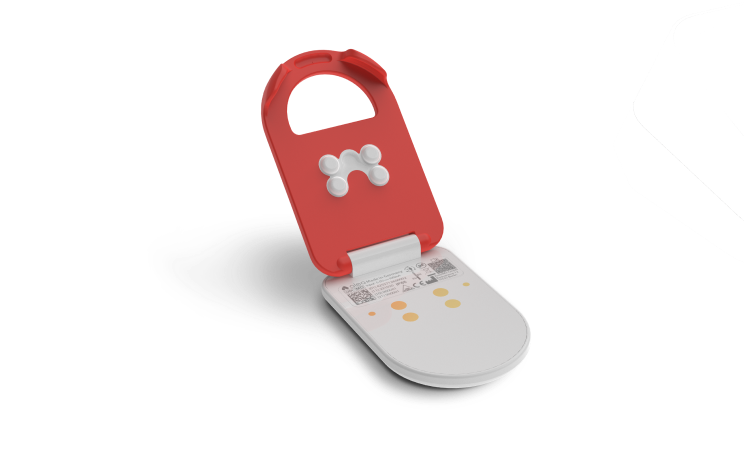
alea-Clip

Clip.png
alea-Clip

How do I change the alea clip?

  • Remove the used clip from the clip pocket of the incontinence pad and insert it into the dock.

  • Remove the fresh, charged clip from the dock and attach it to the template.

Step by step (text and video)

https://youtube.com/shorts/2ul0FGcMpo4?feature=share

  1. Open the clip cover of the clip on the incontinence pad and remove the used clip from the clip pocket.

  2. Insert the used clip into the dock for charging.

  3. Remove the new, charged clip from the dock.

  4. Insert the new clip into the clip pocket of the template and close the clip cover.

  5. Check connection: LED light changes from flashing blue to green as soon as the clip is successfully connected to the sensor strip of the template.

How do I clean the alea-Clip?

  • Clean the clip with water and disinfectant whenever the clip comes into contact with urine or other bodily fluids.

  • Dry the clip afterwards - the clip should be dry when inserting it into the dock or attaching it to the smart incontinence product.

Step by step (text + video)

https://youtube.com/shorts/skqaWST9GBQ?feature=share

  1. Click the clip apart. Open the clip by 90° and pull both parts apart with a twisting motion.

  2. Clean both clip parts under running water.

  3. Disinfect and dry the white clip body. Use a commercially available disinfectant and a fresh cloth. Do not forget corners and edges.

  4. Insert the clip body into the dock for charging.

  5. Disinfect and dry the orange-coloured clip cover. Use a commercially available disinfectant and a fresh cloth. Do not forget corners and edges.

  6. Attach the clip cover to the clip body in the dock so that the clip is reassembled as a whole.

What do I do with the alea clip when changing the Inkontinence Product?

  • Take care not to accidentally dispose of the clip with the used incontinence product!

  • The used clip is placed in the dock for recharging, the used Incontinence Product is disposed of in the waste as usual.

  • We recommend: Attach the fresh clip to the new incontinence product before putting the incontinence product on the patient.

Step by step (text and video)

https://youtube.com/shorts/iKtQlEyFlKA?feature=share

  1. Take offthe fixation trousers.

  2. Remove and fold up the used incontinence product.

  3. Remove the used clip from the incontinence product.

  4. Dispose of the incontinence product in the waste as usual.

  5. Clean the used clip if necessary and then insert it into the dock for charging.

  6. Remove the new, charged clip from the dock and attach it to the new incontinence product.

  7. Check connection: LED light changes from flashing blue to green as soon as the clip is successfully connected to the sensor strip of the template.

  8. Apply new incontinence product to care recipients.

  9. Put onthe fixation trousers.

How and when do I charge the alea clips?

  • First of all: The built-in alea clip battery lasts for up to 24 hours (depending on how many features are activated per resident).

  • The alea app notifies you when the battery status of the clip on the incontinence product is low.

  • We recommend changing the alea clip every time the incontinence product is replaced.

  • One of the clips is charged while the other clip is attached to the incontinence product.

  • If a red LED flashes on the clip, you need to charge the alea clip.

  • If the clip flashes green after inserting it into the dock, this means that it is fully charged.

  • alea clips are only loaded in the alea dock.

Step by step (Video)

How long does the alea Clip take to charge?

  • The charging time is up to 4 hours for a full charge (depending on the charge status at the start of the charging process).

  • Currently, the maximum runtime of the alea chip is up to 24 hours (depending on how many features are activated for the respective resident).

  • Nevertheless, we recommend changing the clip with every incontinence product change.

  • The alea app notifies you when the battery status of the clip on the incontinence product is low.

Can I clean the alea-Clip in the dishwasher?

  • The clip lid can be cleaned in the dishwasher.

  • We recommend brief manual cleaning under running water. The manufacturer has carried out IP 65 certification for the alea hardware.

  • Prolonged cleaning in deeper water should be avoided.

Does the alea-Clip cause radiation exposure or is it fireproof?

  • No, all signals of the alea hardware correspond to everyday and therefore harmless loads.

  • It is very unlikely that the hardware components will catch fire - technically speaking, this possibility exists with all devices that contain a battery.

  • With the alea-Clip, the alea-Dock and the alea-Router, the risk is very low - only if the respective battery is severely damaged is there an increased risk of fire.

  • Note: Do not use force when using alea.

What do I do if the alea clip is defective?

  • Use a replacement clip from your alea hardware store at the respective care location.

  • If the replacement is used up, contact the person responsible for care or contact alea support to order a replacement delivery.

What do I do if the alea clip is lost?

  • If the clip is accidentally disposed of in the rubbish, you will receive a prompt notification in the alea app.

  • If the rubbish symbol is displayed in the alea app, the alea clip is usually actually in the rubbish or under or next to the bed.

  • If the clip cannot be found, use a replacement clip from the alea hardware store on your care setting.

  • There is also the option of taking an alea clip from another care recipient 'X'.

    • Take an alea clip from the care recipient 'X' and

    • insert this into the alea dock of care recipient 'Y';

    • now this alea clip is assigned to 'Y'.

The alea clip lights up red after being attached to the incontinence product, what should I do?

  • The alea-Clip is probably unable to connect to the alea-Dock or an alea-Router.

  • Ensure that the care recipient with the alea clip on the incontinence product is within a 20 metre radius of an alea dock(care recipient's room) or an alea router(communal area).

  • The alea clip is in operation when it briefly lights up blue and then green when it is attached - and no other LED colour flashes.